
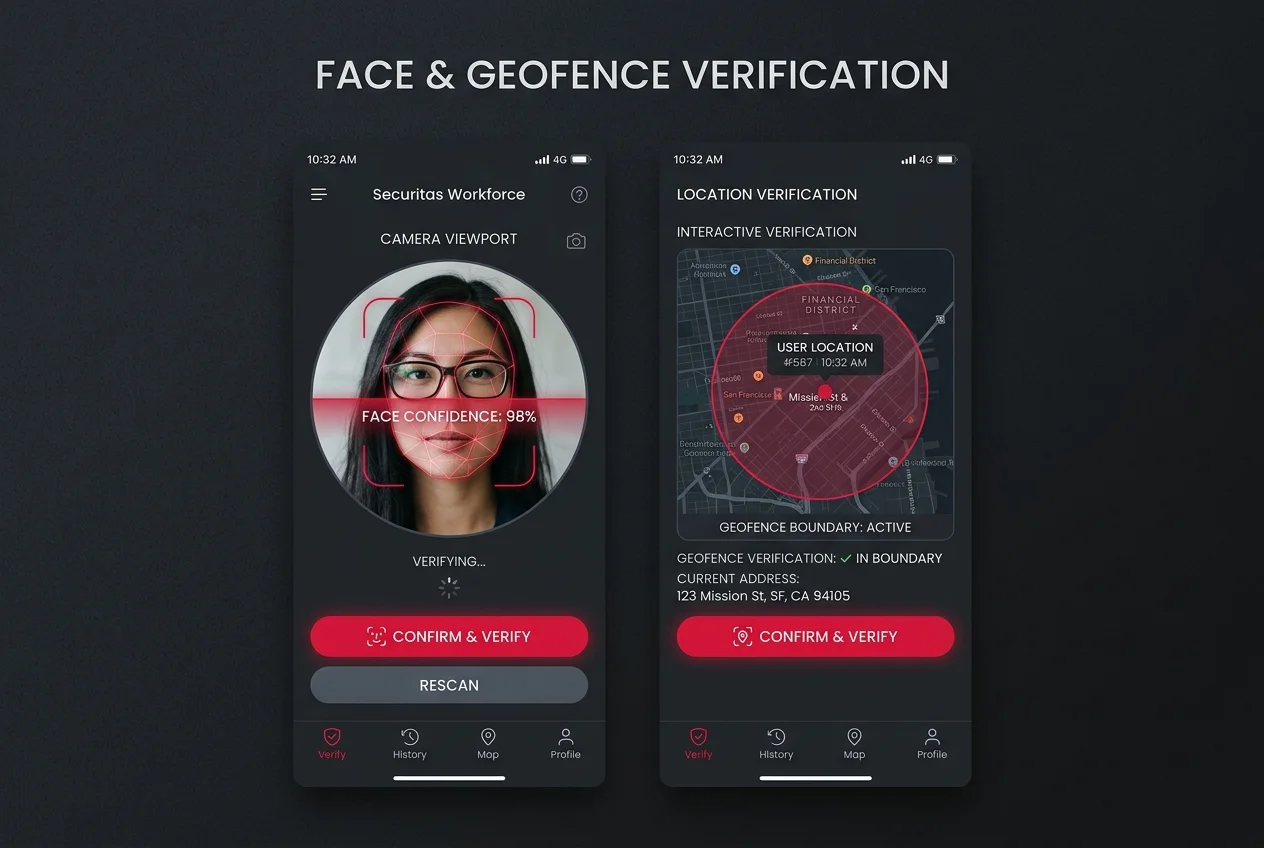
Enforcement, not reporting.
Geofenced attendance, live face verification and client-configured safety workflows are recorded in the mobile app itself, at the moment of the punch, not reviewed after the fact in a report.
controls
available by workflow
question sets
punch-in and punch-out differ
platform uptime
SLA commitment
Attendance controls are configured for the workflow.
The deployment determines which location, identity, roster, and safety controls apply to a punch and how exceptions are handled.
Control 1
Geofence check
An admin draws a circular boundary around a job address and sets the radius. The worker's app shows live distance from center against the allowed radius before it lets them proceed.
Control 2
Photo capture
A live photo is required to continue. The punch button stays disabled until one is taken, not just prompted for.
Control 3
Face confidence
The photo is checked with liveness detection and an anti-spoofing model, and returns a numeric confidence score, not a pass or fail. Low confidence prompts a retake before the worker can continue.
Control 4
Safety Q&A
A short set of hazard questions is reviewed and confirmed. Punch-in and punch-out use different question sets, not the same quiz repeated.
Punch in reviews shift-start hazard questions, specific to the job being started.
Punch out reviews a distinct checkout question set, not the same quiz repeated.
Each control addresses a specific verification need.
A single login or a manual timesheet may not provide the verification record an operation needs. Controls can be combined where the client workflow calls for them.
Gate 1, Geofence check
Closes: A punch logged from off-site, before the worker has actually arrived.
Gate 2, Photo capture
Closes: A punch submitted with no worker actually present to capture.
Gate 3, Face confidence
Closes: Buddy punching, one worker clocking in on behalf of another.
Gate 4, Safety Q&A
Closes: A shift started unbriefed, or an incident that goes unreported at close.
Configured per site, not a fixed default.
An admin searches a job address on a map and sets a circular boundary radius for that site specifically. There is no single platform-wide geofence size: a warehouse perimeter and a single storefront are configured differently, by the people who know the site. On an overnight, single-officer security post, this boundary check is often the only independent confirmation that a guard was actually there.
The worker's app shows live distance from the boundary center against the allowed radius, in real time, before the punch is accepted.
A confidence score, reviewed by the worker.
Face verification returns a numeric confidence score at the moment of capture. Low confidence prompts a retake in the app itself, not a rejected timesheet reviewed days later.
Identity can optionally be matched against the profile photo set once during onboarding, in addition to the liveness and confidence check at every punch.
A live capture, checked for signs it was faked.
The face check runs liveness detection and an anti-spoofing model against the capture, with an optional identity match against the profile photo set at onboarding. The model itself is hosted internally rather than routed to a third-party vendor at every punch.
The camera requires a fresh capture at every punch. A photo from a previous shift, or a picture of a picture, is what the liveness check exists to catch.
A worker can retry, on the spot.
The photo capture step is a hard gate before it is a check: the punch action itself stays disabled until a photo is taken, not just requested. If a capture comes back low confidence, the worker retakes, removes, or cancels it from the same screen, and tries again before the punch continues.
This runs on the worker's own device, in the field, rather than as a rejected timesheet line an office reviews after the shift is already over.
A hard block, not a flag someone reviews later.
When a gate fails, the punch action is not offered, or stays disabled, on the worker's own device, at that moment. Generic HR and HCM suites report on attendance after the fact; enforcement is built into the mobile app flow itself.
A blocked punch is a blocked punch, decided on-site, not a variance flagged in a report an admin gets to days later.
The actual route traveled, not a self-reported log.
A single shift can nest multiple job-site check-in and check-out stops, each independently timestamped and photo-documented. Distance and travel time between waypoints are computed from real GPS readings, so the route a worker actually took is reviewable, not just the hours they reported. That is what a logistics and delivery operator checks a multi-stop route against, one verified punch per stop.
Distance and travel time per leg are logged automatically, for every stop in the shift.
Punching in and out needs a live connection.
Geofence and face checks are validated in real time against a live GPS reading and a live camera capture, so punch in and punch out specifically require an active connection at that moment. That trade-off is deliberate: the gates that establish where a worker is and who they are cannot be taken on faith and reconciled later.
A worker needs a live connection at the moment they punch in or out.
Your security posture governs it, not ours.
Hirebase deploys into your own Azure tenancy as a single-tenant system, on infrastructure your security team already governs and already audits. No shared database. No vendor-held copy of your workforce data. Nothing to take on faith about where a verification photo or an attendance record actually lives.
No multi-tenancy, no shared surface
Every client gets a dedicated, isolated deployment, not a seat on a shared multi-tenant database. There are no other tenants in the environment, so there is no cross-tenant leakage surface: no shared database boundary for one tenant's misconfiguration to cross into another tenant's records.
Deployed into your own Azure tenancy
The deployment runs on the client's own Azure accounts and infrastructure, not servers Hirebase owns. Verification photos, geofence data, and attendance records never leave infrastructure the client already controls and already audits.
You inherit your own compliance posture
The deployment sits inside an Azure environment your own security and compliance teams already govern. The controls, identity policies and review process you apply across the rest of your estate apply here too, so there is no separate vendor environment to assess.
Inspect it yourself, in your own environment.
Because the deployment sits inside infrastructure you own, your security team can review it directly against the controls you already run, on your own schedule. Bring your requirements to the conversation early and we will map the deployment to them.
One fewer vendor to solve this for.
A fragmented stack means the same residency, data-processing agreement, and breach-surface questions get answered separately for every vendor in it. Zoho spreads HR, learning, e-signature, telephony, field service, and CRM across six separately-billed products, two of them, telephony and field service, sold entirely outside its own bundled plan. SAP runs five products across three different clouds plus a mandatory third-party CTI vendor for telephony it does not natively provide, six procurement relationships in total. Oracle adds a mandatory third-party CTI vendor on top of its own two separate cloud pillars for HCM and CX, a third procurement relationship for a capability Hirebase ships in-product on a single carrier-agnostic framework — no separate CTI vendor to procure, with the underlying carrier configurable by region or client preference. A single client-hosted system answers the residency and breach-surface question once, for the whole stack, instead of once per vendor.
Onboarding
Activation
Field Execution
Monitoring
Completion
Exit
Verification runs continuously through Field Execution and Monitoring, the two stages where a worker is actively on shift.
Go deeper
Practical answers for your evaluation
Verified identity.
Enforced attendance.
We will map Hirebase to your compliance framework,
your ERP and your region.