
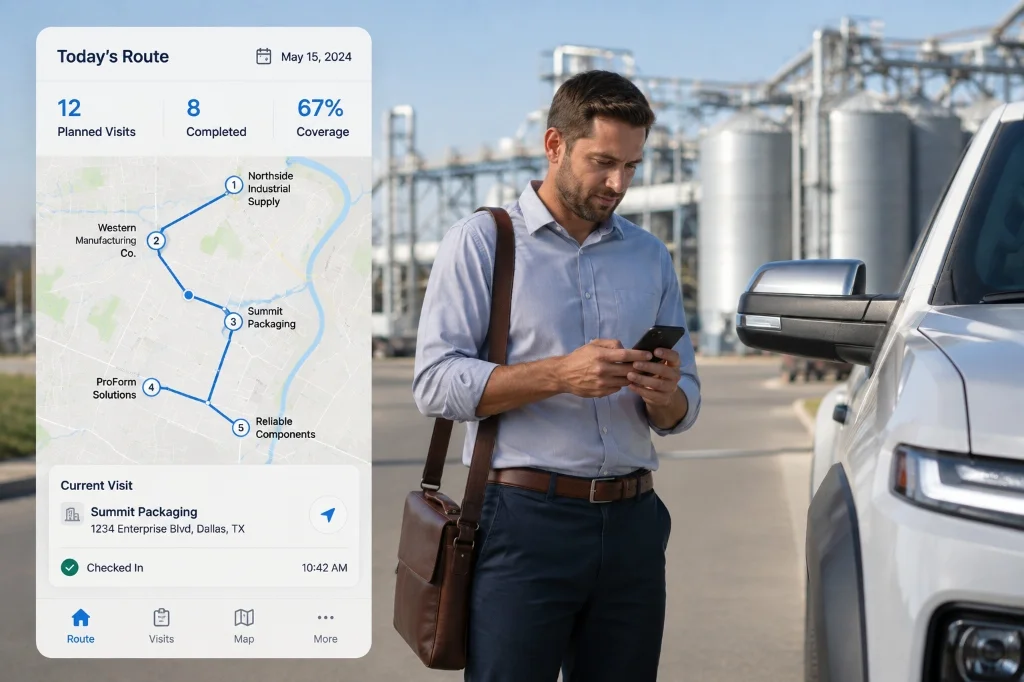
A rep's route, verified, not assumed.
A field-sales rep works a territory unsupervised. A sales manager needs to know which stops actually happened, not just which stops were planned.
You can't manage a route you can't see.
A rep's day happens across a territory, not in an office. The morning starts with a planned list of stops, and by evening a sales manager is reconciling that plan against whatever the rep reports back, with no independent way to confirm a stop actually happened, when it happened or what it produced.
That gap shows up as unverified activity: stops marked complete with nothing behind them, a route that looks finished on paper but was never actually walked, and a manager who can't tell coverage from a guess until a deal falls through weeks later.
Closing that gap means two things have to exist together: a record of the plan that updates as the day changes, and independent proof that each stop on it was real.
Route List
One record per rep per date, with every stop tracked independently for status and visit time.
Verification & Enforcement
Geofence and photo verification confirm a rep was actually where a stop says they were.
Reports
Roll territory activity up into reporting a sales manager can actually review.
The route lives in one record, not a stack of check-ins.
A field-sales rep doesn't get a new record for every stop. Route List holds one record per rep per date, and stops get added to it as a dynamically-editable "Pipeline" list, so the plan can change shape as the day does.
Each stop on the Pipeline list is tracked independently: its status, whether it was visited, a phone number and a visit time. Nothing about one stop is inferred from another, and a rep can add or edit a stop mid-route as plans change.
A rep's Route List record can carry multiple stops added and edited over the course of a single day, each one its own tracked entry on the same record.
Every change to every stop, who added it, who updated it and when, is captured in a full timestamped Status Log on the same record. The audit trail is per-stop, not just per-record, so a manager reviewing a rep's day sees exactly what changed and at what time, not just a final tally.
Users Tracking pairs a live map view of where reps are and what appointments they have alongside the Route List record itself.
A single punch session can nest multiple job-site check-ins, and a route map computes distance and travel time per leg between them. That is route tracking, reviewed after the fact on a map, not route planning or optimization in advance.
Full mechanism detail on /platform/sales.
A stop marked visited still needs proof it happened.
A field-sales rep can mark any stop as visited on the Route List. What confirms it is a separate check run in the mobile app itself: geofence check, a live photo checked with liveness detection and anti-spoofing, and a short safety Q&A, in that order.
An admin draws a circular geofence boundary around a stop address and sets the radius. The rep's app shows live distance from center against the allowed radius, and out-of-geofence stops are flagged for review.
A live photo, checked at the stop.
A live photo is required to continue, checked with liveness detection and anti-spoofing rather than accepted as a static image, captured at the stop itself, not typed into a report reviewed days later.
Between geofence, photo verification and safety Q&A, a manager gets independent evidence a rep was physically at a stop, not just that the app was tapped.
Identity checks run against the rep's own onboarding profile, set once and referenced at every stop after.
Full gate-by-gate detail on Verification & Enforcement.
Territory activity rolls up into reports, not a spreadsheet a rep fills in.
The Performance & Field report cluster covers Work Hours, Job Performance and Service Report, each independently filterable and exportable to CSV, giving a sales manager a way to review coverage without chasing every rep individually.
The Enhanced Punch report reconciles every punch against Distance From Job, Travel Time and Traffic Time, using real routing data, with an in/out selfie and map pin attached to the same punch record.
That distance and travel-time detail sits next to the same visual and location confirmation used to verify a stop, so a route's reported coverage and its verified coverage can be checked against each other.
Full report catalog on /platform/reports.
Route List record
per rep, per date, every stop logged
verification checks
in the sequence that confirms a stop
Go deeper
Practical answers for your evaluation
Know where the territory
was actually covered.
We will map Hirebase to your compliance framework,
your ERP and your region.